
CodePeel VS Code Extension: Inline Review Walkthrough
What happens when you run a review in the CodePeel VS Code extension: diff assembly for each review mode, the review request, diagnostics, inline comments, and applying fixes.
The CodePeel VS Code extension brings AI code review directly into your local editor before you push code. Instead of waiting for CI feedback on GitHub, you can review staged edits, inspect findings in the Problems panel, view inline gutter squiggles, and apply automated fixes with a single keystroke.
Key Takeaways
- Pre-Commit Feedback Loop: Catch security flaws and critical bugs while the file is still active in memory, before commits enter git history.
- 4 Granular Diff Modes: Review uncommitted edits, the git index, entire branch diffs, or combined working changes.
- Native Editor Integration: Findings map directly to VS Code Diagnostics, gutter decorations, and lightbulb Quick-Fix actions.
- Multi-Agent Routing: One-click hand-off routes complex multi-file findings directly to Claude Code or GitHub Copilot.
VS Code inline review is the practice of running automated code review locally inside the editor before changes are committed or pushed to a remote repository. It eliminates the slow cycle of pushing code, waiting for pull request webhooks, and reading comments in a web browser.
This walkthrough follows a full local review cycle: assembling the git diff, parsing findings, rendering editor decorations, and executing automated code repairs.
Install and sign in
Install the official CodePeel extension from the Visual Studio Marketplace (extension identifier codepeel.codepeel-vscode), or sideload the package from GitHub Releases. The extension contributes an activity bar icon, explorer view, custom commands, and context menu shortcuts.
VS Code Activity Bar
┌─────────┐
│ CodePeel│ ──► Sidebar Panel (Diff Modes, Review Button, Quota Meter)
└─────────┘
     │
     ├── Editor Gutter Squiggles (Red/Orange diagnostics on exact lines)
     ├── Problems Tray Integration (Mapped to VS Code severity filters)
     └── Inline Hover Widget ("Apply Fix" or "Delegate to AI Agent")
Authentication requires a single browser sign-in or a static API token. Sessions persist securely in local secret storage. Your monthly review balance synchronizes across GitHub webhooks, the local editor, and the Claude Code MCP server.
Choosing what gets reviewed: the four diff modes
Reviews begin by assembling a clean unified git diff. The extension executes local git commands based on your active mode:
| Mode | Target Scope | Underlying Git Mechanics | Best For |
|---|---|---|---|
| Working changes | All branch edits (Committed + Uncommitted) | git diff base...HEAD concatenated with unstaged and staged diffs | Pre-PR comprehensive pass |
| Uncommitted | Uncommitted working directory | git diff combined with git diff --cached | Rapid sanity checks |
| Staged | Staging index only | git diff --cached | Pre-commit hook checks |
| Branch diff | Full feature branch vs base | git diff base...HEAD (Three-dot merge-base) | Final review before opening PR |
The default Working changes mode mirrors what a GitHub pull request reviewer sees. It merges your committed branch changes with uncommitted local adjustments.
Diffs are capped at 500 KB to maintain fast response times. If an oversized refactor exceeds this limit, slice your review into targeted staged chunks.
Triggering the review engine
Click Review Changes in the sidebar. The extension packages the diff payload and transmits it over TLS to CodePeel's review endpoint. Within seconds, the server returns a structured array of findings. Each item contains line markers, severity levels, category labels, explanations, and exact code patches.
The review engine executes the identical two-layer pipeline that runs on pull requests: deterministic secret matching first, followed by model-driven SAST. For deep details on the vulnerability checks, consult How CodePeel's OWASP Security Scanning Works.
Where findings appear in the editor
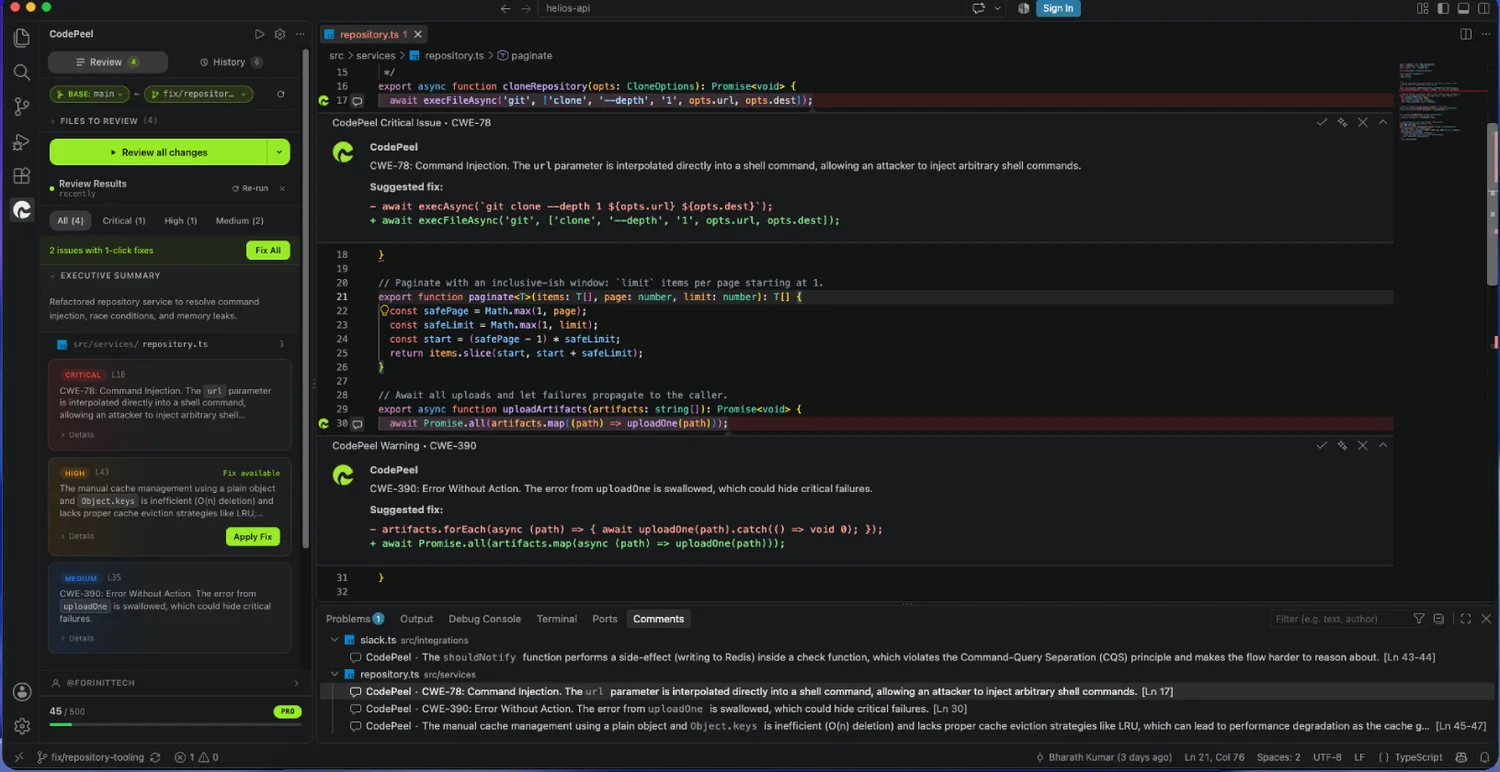
Findings surface across three synchronized editor surfaces using the VS Code Extension API:
- Editor squiggles and Problems tray: Each finding registers as a native VS Code Diagnostic. Severity tags map cleanly:
criticalbecomes Error,highbecomes Warning, andmediumbecomes Information. - Interactive findings tree: The sidebar groups issues by file and severity badge. Selecting an issue jumps directly to the flagged line.
- Threaded inline comments: Findings appear directly between code lines, showing the vulnerable snippet alongside the recommended replacement.
The extension includes stale-finding detection. When you modify code around a diagnostic, the extension verifies if the snippet still matches. If the text has drifted, the squiggle clears automatically.
Acting on a finding
Every surfaced issue provides four rapid actions:
- Apply Suggested Fix: Writes the suggested code replacement directly into your active editor buffer. The change is immediate, uncommitted, and fully undoable with standard undo (
Ctrl+Z/Cmd+Z). - Fix with AI Agent: Routes the finding context directly to local AI assistants (Claude Code, Cursor Composer, or GitHub Copilot).
- Fix All Issues: Applies all non-conflicting suggested patches in a single batch pass.
- Copy Replacement: Copies the replacement code to your clipboard for manual editing.
Quick-fixes also integrate with VS Code's native lightbulb code-action menu (Ctrl+. / Cmd+.).
End-to-end review walkthrough
Imagine you just implemented an API endpoint and want to verify changes before committing:
- Select mode: Choose Uncommitted in the CodePeel sidebar and click Review.
- Review output: The engine flags a critical security issue on line 42: dynamic user input concatenated directly into a database query (CWE-89).
- Inspect diagnostics: A red squiggle highlights line 42. Hovering over the line displays the vulnerable snippet and a parameterized SQL query replacement.
- Apply fix: Click Apply Suggested Fix. The parameterized query replaces the string concatenation, and the diagnostic clears.
- Re-run review: Trigger a quick uncommitted check. The security error is resolved, leaving only an advisory note.
- Commit and push: Push clean commits to GitHub. When the pull request opens, pre-merge quality gates verify compliance automatically.
By catching defects early, pull request discussions focus on architecture rather than syntax errors. To evaluate how thoroughly local reviews catch planted defects, read How to Benchmark an AI Code Reviewer.
Practical configuration recommendations
- Review in logical slices: Staged reviews provide precise feedback on large multi-file refactors.
- Set comparison branch explicitly: When working on complex release branches, configure the base comparison target in extension settings.
- Review history preservation: Previous review passes remain stored in local history, allowing you to re-read findings after pushing code.
- Automate pull request follow-ups: For remaining pull request findings, learn How Auto-Fix PR Generation Works End to End.