
AI code review in VS Code, before you even push
PR reviewers catch problems after the commit. The CodePeel VS Code extension reviews your working, staged, or branch changes inline — catch the risky line while you are still in the file.
Updated October 2026 · Written by the CodePeel team · Install takes minutes from the VS Code Marketplace.
The review, moved left of the commit
The GitHub App reviews what you already pushed. The extension reviews what you are about to — same engine, earlier in the loop. Three things that change in practice:
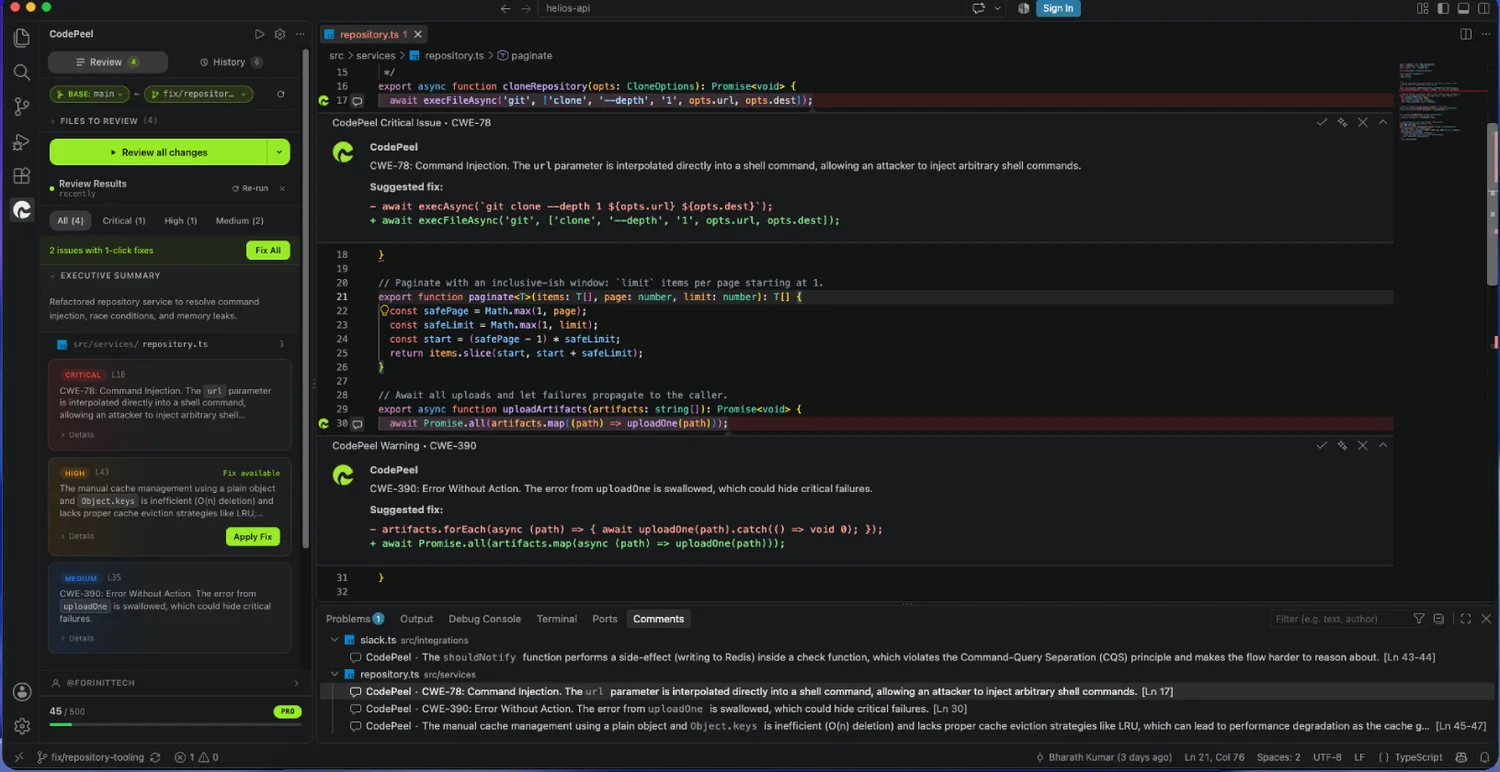
Findings in your editor, not a browser tab
Review results appear as diagnostics and inline comments next to your code. Read the risk, inspect the fix, keep your focus where the change is.
Review working, staged, or branch changes
Check uncommitted work before it becomes a commit, or review a whole feature branch before you open the pull request. Three review modes, one command.
Suggested fixes you can apply directly
Where CodePeel has a fix, apply it from the editor and re-review. The change stays yours — nothing is written to your branch without your approval.
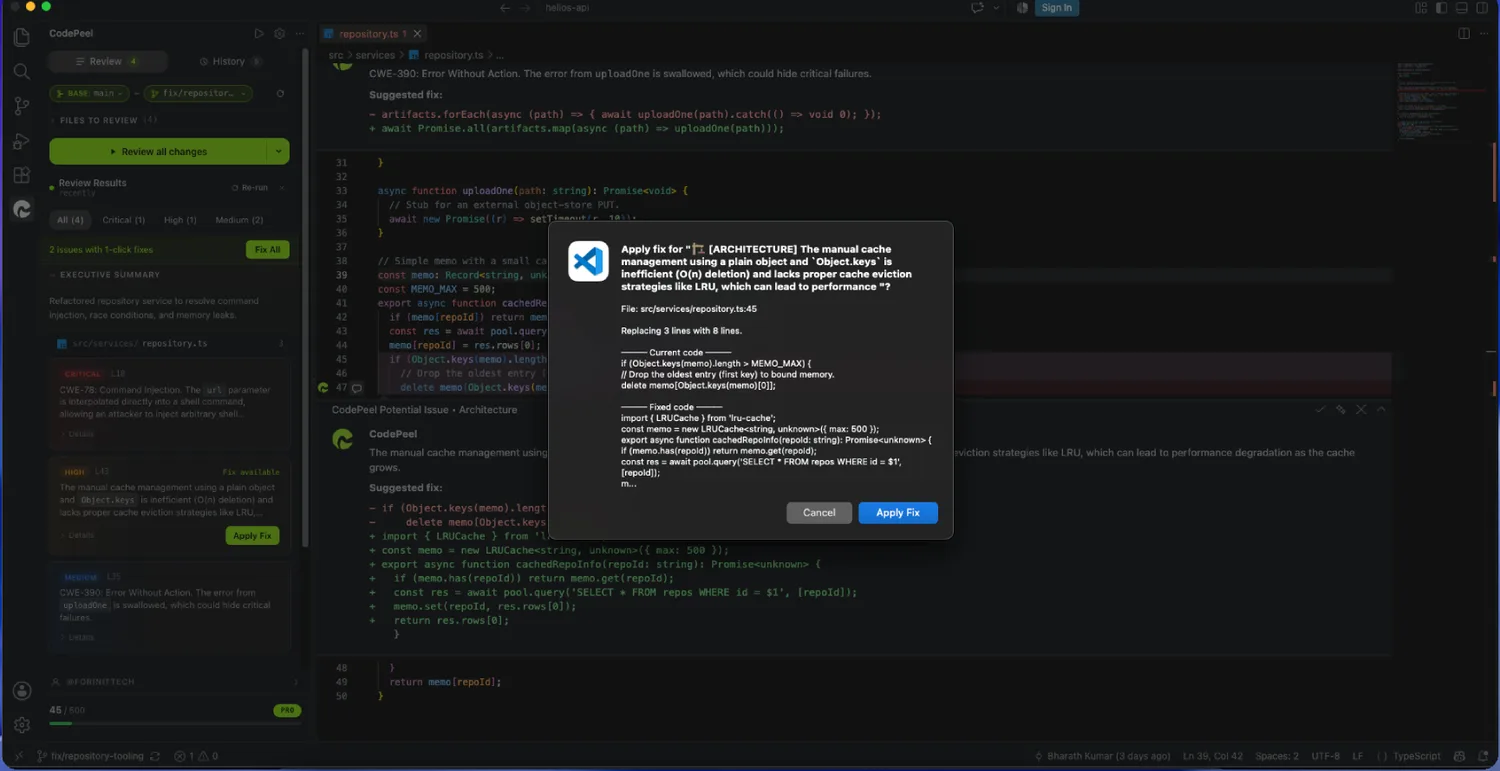
Setup: from install to first review
- Install the CodePeel extension from the VS Code Marketplace.
- Sign in with your CodePeel account — the same one as the GitHub App.
- Pick a review mode: working changes, staged, or a branch.
- Run the review and read findings inline; apply suggested fixes where they make sense.
The full walkthrough lives in the VS Code extension guide, and the inline review walkthrough shows what happens under the hood.
What the editor pass catches before the commit
Findings that would otherwise wait for a pull request:
Broken paths in uncommitted work
The refactor you are halfway through is reviewed as-is: missing null checks, changed return shapes, calls left pointing at renamed functions.
Secrets about to be pushed
A debug key in a config file or a credential in a new helper is flagged while the change is still local — cheaper than rotating it after the push.
Fixes without a context switch
Suggested fixes open beside the diagnostic. Apply, re-review, and keep writing — the PR review then confirms the finished change.
Honest limits
Where the boundary sits:
Local changes only, for now
The extension reviews working, staged and branch changes in the open repository. PR conversation management happens on GitHub, where the App handles it.
Large diffs are sampled
A change beyond the review window is analyzed in sections; cross-file interactions across a very large diff may not all be caught. The PR pass adds the final look.
Findings are still findings
Editor diagnostics carry the same possibility of being wrong. Apply a fix because you verified it, not because the tool proposed it.
Frequently asked questions
Which review modes does the extension support?
Working changes, staged changes, or a whole branch against its base — pick per review, depending on how far along you are.
Do I need the GitHub App too?
They are strongest together but independent: the extension signs in with your CodePeel account, and the GitHub App covers the pull request pass.
Does applying a suggested fix edit my files?
Only after you inspect and accept it. Fixes are proposals with a visible diff — nothing is written to your working tree automatically.
More comparisons and guides
- Review before you push: inline review in VS Code — How the extension pass works, line by line.
- The VS Code extension docs — Working, staged, and branch review modes in detail.
- Best AI code review tools (2026) — All eight tools in one pricing table, weaknesses included.
Find the risky line before it becomes a PR.
Free, on your own repos — the extension, the GitHub App, and MCP share one account.