

CodePeel vs GitHub Copilot code review: bundled generalist vs critical-only specialist.
Copilot’s code review ships with GitHub itself — no extra vendor, native PR experience, broad language coverage. CodePeel is a dedicated reviewer focused on critical bugs, security vulnerabilities, and design flaws, with a free tier that works even if you never buy Copilot. Copilot wins on convenience; CodePeel wins on signal focus and security depth.
Updated October 2026 · Written by the CodePeel team · Every claim about GitHub Copilot code review links to GitHub Copilot code review’s own pages, so you can verify it.
At a glance
| Fact | CodePeel | GitHub Copilot code review |
|---|---|---|
| Free tier | 30 reviews/mo, unlimited public + private repos | Requires a Copilot subscription |
| Pricing | Pro $9.99/user/mo · Max $24.99/mo unlimited | Copilot from $10/user/mo — reviews consume credits |
| Review focus | Critical bugs, security issues, design flaws | General-purpose review comments |
| Security depth | Security findings on the affected line | General checks, security not the focus |
What is CodePeel?
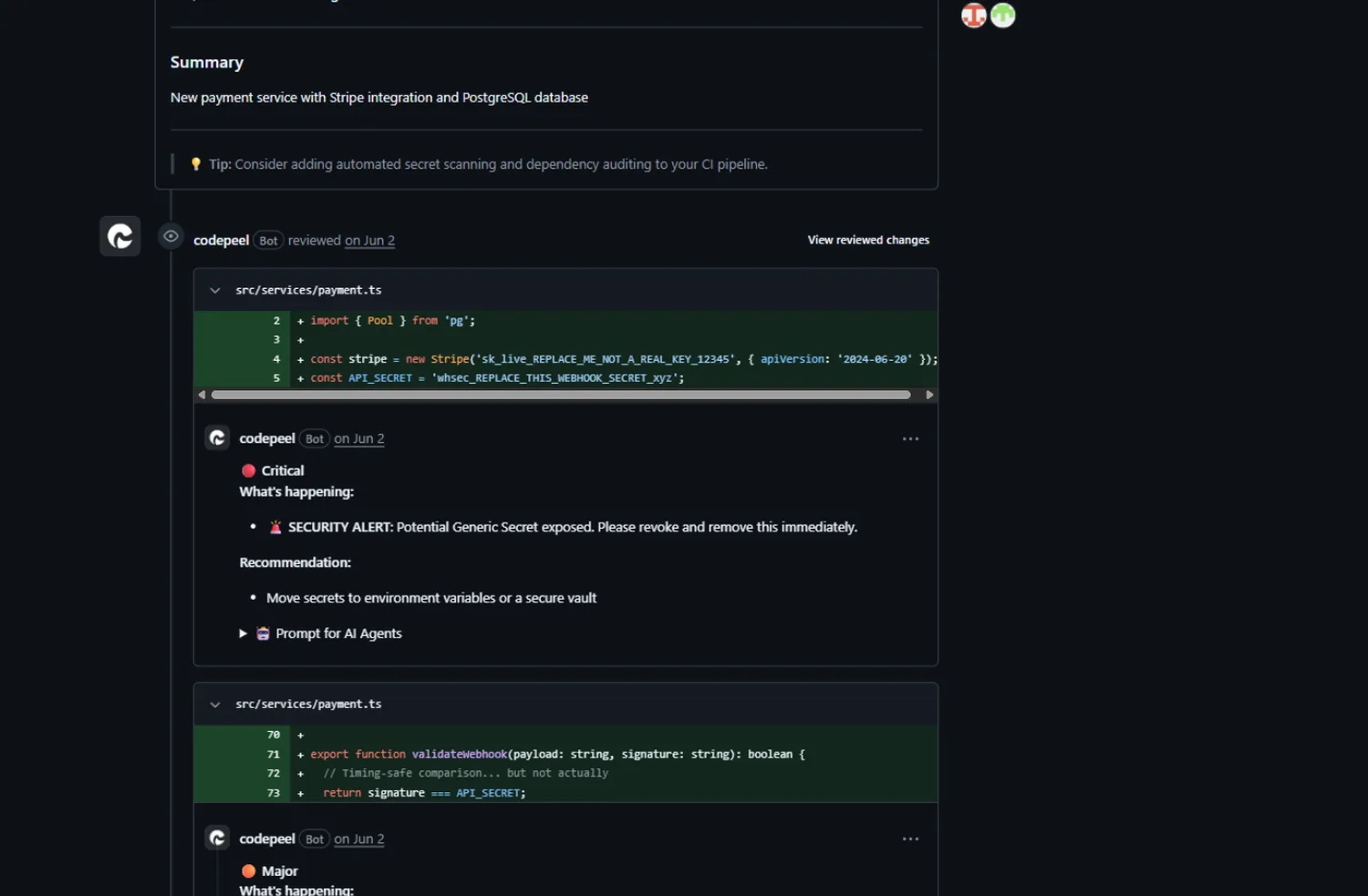
CodePeel is an AI code reviewer for GitHub. Install the GitHub App and it reviews new pull requests for critical bugs, security vulnerabilities, and design flaws — findings land on the affected line with a suggested fix, you can ask @codepeel about any finding, and on Pro it can open a separate pull request with the fix applied. A VS Code extension and an MCP server are included in every tier, and the free plan covers 30 reviews a month on unlimited public and private repositories.
What is GitHub Copilot code review?
Copilot code review is part of GitHub Copilot. Request a review from Copilot on any pull request and it leaves comments natively in GitHub, consuming Copilot premium request credits (or AI credits on newer plans). It is a general-purpose reviewer applying general review judgment.
CodePeel vs GitHub Copilot code review, dimension by dimension
| Dimension | CodePeel | GitHub Copilot code review |
|---|---|---|
| Free tier | 30 reviews/mo, unlimited public + private repos | Requires a Copilot subscription |
| Pricing | Pro $9.99/user/mo · Max $24.99/mo unlimited | Copilot from $10/user/mo — reviews consume credits |
| Review focus | Critical bugs, security issues, design flaws | General-purpose review comments |
| Security depth | Security findings on the affected line | General checks, security not the focus |
| Extra vendor | One (CodePeel) | None — native to GitHub |
| Editor access | VS Code extension included | Copilot across editors |
| Auto-fix | Opens fix pull requests on Pro | Copilot agents and Workspace |
| Cost model | Flat monthly allowance | Credit consumption, varies with usage |
Sources: codepeel.com/pricing · github.com/features/copilot/plans. Plans change often in this market — verify both before deciding.
Where GitHub Copilot code review wins and falls short
GitHub Copilot code review’s strengths
- Native to GitHub — no new vendor, no new integration, no new bill
- Bundled price with a plan most teams already have
- Broad language and framework coverage
- Part of a large ecosystem: Copilot in the IDE, agents, Workspace
GitHub Copilot code review’s weaknesses
- General-purpose review — it will comment on style alongside real risks
- Review costs are opaque: credits consumed vary PR to PR
- Security review is not the focus, and depth varies by language
- Little control over what it reports and what it ignores
Where CodePeel wins and falls short
No comparison written by a vendor is neutral, so the weaknesses are here too.
CodePeel’s strengths
- Specialized engine tuned for critical bugs, security issues, and design flaws
- Free tier stands alone — no Copilot subscription required
- Transparent pricing: reviews are the unit, allowances are published
- Security findings land on the affected line with a suggested fix
- Auto-fix PRs on Pro, @codepeel chat on every finding
CodePeel’s weaknesses
- It is another vendor to manage alongside GitHub’s own tools
- GitHub only, while Copilot spans editors and platforms
- No general coding-assistant features — CodePeel reviews, it does not autocomplete
The verdict: choose CodePeel if… choose GitHub Copilot code review if…
Choose CodePeel if You want a dedicated security-and-critical-bugs pass on top of — or instead of — Copilot’s general comments, with a free tier you can run on private repos today.
Choose GitHub Copilot code review if You want zero extra vendors and are fine with general-purpose review quality, especially if your team already pays for Copilot seats.
Frequently asked questions
Which one is free — Copilot code review or CodePeel?
CodePeel’s plan includes free reviews; Copilot code review requires a Copilot subscription — from the Free tier with limited usage to Pro at $10/user/month and Business plans. Reviews consume premium request or AI credits, so heavy review usage can push you into paid credit territory. There is no standalone free review tier the way CodePeel’s 30 monthly reviews are free.
What is the main difference?
Specialization. Copilot code review applies a general model to your PR, so comments range from real risks to style notes. CodePeel reports only critical bugs, security vulnerabilities, and design flaws — deliberately quieter, with security findings tied to the affected line.
Can I use both together?
Yes, and many teams do. Copilot handles general questions and suggestions in the IDE; CodePeel runs the critical-issues pass on every pull request. They do not conflict — both comment as separate reviewers.
Which is cheaper?
If you already pay for Copilot, its review feature feels free — until credit consumption grows. As a dedicated reviewer, CodePeel’s $9.99 Pro (500 reviews) or $24.99 Max (unlimited) is a published, predictable line item.
Is CodePeel better at security review?
Security is one of CodePeel’s three core focus areas, with findings referencing the affected line and suggested fixes. Copilot’s security review is general-purpose. For OWASP-style vulnerability hunting, a dedicated reviewer is the more reliable choice.
More comparisons
- Best AI code review tools (2026) — All eight tools in one table — pricing, strengths, weaknesses, best-for verdicts.
- CodePeel vs CodeRabbit — Agentic teams and multi-platform governance versus critical-only signal.
- CodePeel vs Cursor BugBot — Cursor-bundled reviews versus a standalone GitHub reviewer.
Add the critical-issues pass.
Free, on your own repos.