

CodePeel vs CodeRabbit: which AI reviewer fits your team?
CodeRabbit is a strong pick for teams running agentic development at scale — it ships walkthrough summaries, governance controls, and support for GitHub, GitLab, Bitbucket, and Azure DevOps. CodePeel is built for solo developers and small GitHub teams: critical-only findings, a free tier with 30 reviews a month on unlimited private repositories, and from about $0.02 per review on Pro.
Updated October 2026 · Written by the CodePeel team · Every claim about CodeRabbit links to CodeRabbit’s own pages, so you can verify it.
At a glance
| Fact | CodePeel | CodeRabbit |
|---|---|---|
| Free tier | 30 reviews/mo, unlimited public + private repos | Free plan for open-source repositories |
| Paid pricing | Pro $9.99/user/mo · Max $24.99/mo unlimited | Essentials $24/user/mo billed annually ($30 monthly) · Team $48 · Advanced $72 |
| Pricing model | Monthly review allowance, flat | Per-seat subscriptions |
| Cost per review (Pro) | ~$0.02 per review at the Pro allowance | Varies with seats and plan tier |
What is CodePeel?
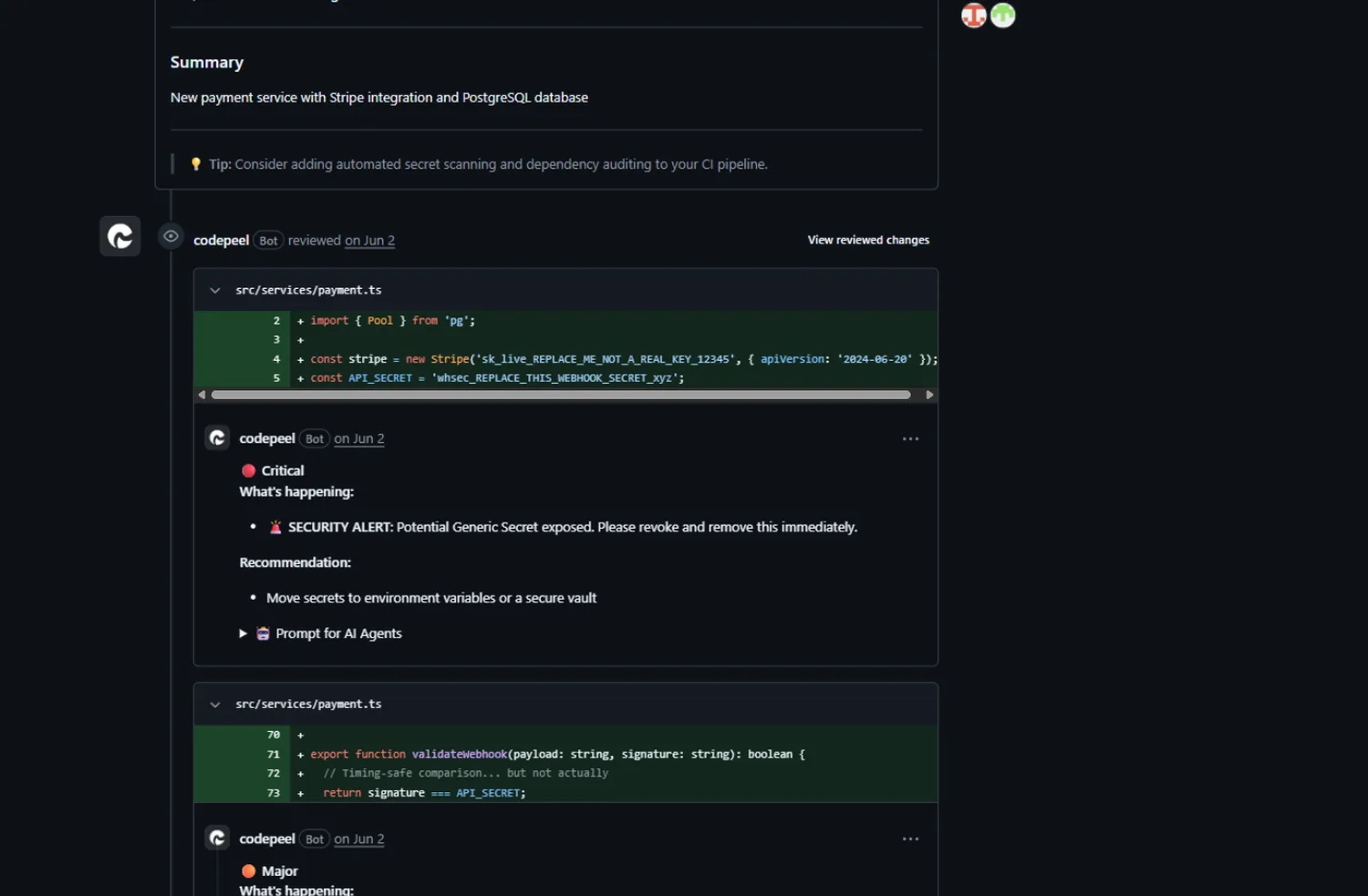
CodePeel is an AI code reviewer for GitHub. Install the GitHub App and it reviews new pull requests for critical bugs, security vulnerabilities, and design flaws — findings land on the affected line with a suggested fix, you can ask @codepeel about any finding, and on Pro it can open a separate pull request with the fix applied. A VS Code extension and an MCP server are included in every tier, and the free plan covers 30 reviews a month on unlimited public and private repositories.
What is CodeRabbit?
CodeRabbit reviews pull requests with walkthrough summaries, issue-level findings, and review artifacts, and markets an agentic SDLC layer — custom agents, governance, and integrations across GitHub, GitLab, Bitbucket, and Azure DevOps. It is a comprehensive reviewer: a lot of feedback, aimed at teams.
CodePeel vs CodeRabbit, dimension by dimension
| Dimension | CodePeel | CodeRabbit |
|---|---|---|
| Free tier | 30 reviews/mo, unlimited public + private repos | Free plan for open-source repositories |
| Paid pricing | Pro $9.99/user/mo · Max $24.99/mo unlimited | Essentials $24/user/mo billed annually ($30 monthly) · Team $48 · Advanced $72 |
| Pricing model | Monthly review allowance, flat | Per-seat subscriptions |
| Cost per review (Pro) | ~$0.02 per review at the Pro allowance | Varies with seats and plan tier |
| Platforms | GitHub | GitHub, GitLab, Bitbucket, Azure DevOps |
| Editor access | VS Code extension included, all tiers | Editor integrations on paid plans |
| Agent access | MCP server included, all tiers | Agentic workflows on team plans |
| Review style | Critical bugs, security issues, design flaws — only | Walkthroughs plus comprehensive findings |
| Auto-fix | Opens fix pull requests on Pro | Agentic change workflows |
| PR conversation | Ask @codepeel directly on the PR | Chat with the review bot on the PR |
Sources: codepeel.com/pricing · www.coderabbit.ai/pricing. Plans change often in this market — verify both before deciding.
Where CodeRabbit wins and falls short
CodeRabbit’s strengths
- Detailed walkthrough summaries and review artifacts for every PR
- Agentic SDLC tooling — custom agents, automated change workflows
- Works across GitHub, GitLab, Bitbucket, and Azure DevOps
- Enterprise controls: governance, compliance reporting, SSO options
- A large docs and content library for teams adopting agentic development
CodeRabbit’s weaknesses
- Seat-based pricing multiplies quickly as the team grows
- The free tier is mostly limited to open-source repositories
- Comprehensive feedback can bury critical issues without tuning
- More configuration surface than a solo developer needs
Where CodePeel wins and falls short
No comparison written by a vendor is neutral, so the weaknesses are here too.
CodePeel’s strengths
- Free tier covers unlimited private repositories, not just open source
- Critical-only signal — six findings worth reading instead of sixty
- Flat pricing: $9.99 Pro or $24.99 unlimited Max, no per-seat creep
- VS Code extension and MCP server included in every tier
- Installs as a GitHub App — no API keys, minutes to first review
CodePeel’s weaknesses
- GitHub only — if you need GitLab or Bitbucket, CodeRabbit supports them
- Reviews the diff with surrounding context, not a whole-repo index
- Younger product with a smaller integration ecosystem
- Metered allowances (30 free, 500 Pro) rather than unlimited on Max only
The verdict: choose CodePeel if… choose CodeRabbit if…
Choose CodePeel if You merge alone or in a small GitHub team, you want critical bugs and security issues called out without a wall of style comments, and you need private repositories covered on a genuinely free plan.
Choose CodeRabbit if You run an established team with agentic development workflows, you need GitLab, Bitbucket, or Azure DevOps support, or your organization requires governance and enterprise controls.
Frequently asked questions
Is CodePeel cheaper than CodeRabbit?
For small teams, usually yes. CodeRabbit’s Essentials plan runs $24 per user per month (annual), so a five-person team pays roughly $120/month. CodePeel Pro is $9.99 per user per month with 500 reviews — about $50 for the same team — and Max is $24.99/month flat for unlimited reviews.
What is the main difference?
Review philosophy. CodeRabbit aims for comprehensive coverage — walkthroughs, findings, and agentic workflow tooling for teams. CodePeel deliberately reports only critical bugs, security vulnerabilities, and design flaws, so the signal stays readable for people who review alone.
Can I migrate from CodeRabbit?
Install the CodePeel GitHub App on the same repositories and it starts reviewing new pull requests immediately. Disable CodeRabbit’s reviews when you are satisfied — most people run both on a non-critical repo for a week first.
Does CodePeel work with GitLab or Bitbucket?
No — CodePeel is GitHub-only today. If your repos live on GitLab, Bitbucket, or Azure DevOps, CodeRabbit’s multi-platform support is the better fit and that is a real reason to pick it.
Which tool has the better free tier?
CodePeel’s free plan covers 30 reviews a month on unlimited public and private repositories. CodeRabbit’s free plan is oriented to open source — free reviews forever on public repositories, while private repositories need Essentials at $24 per user per month billed annually. Verify current terms at coderabbit.ai/pricing.
Can I run both tools at once?
Yes. Install both GitHub Apps on a non-critical repository and compare their reviews on your own pull requests. CodePeel’s free tier makes that side of the experiment free.
More comparisons
- Best AI code review tools (2026) — All eight tools in one table — pricing, strengths, weaknesses, best-for verdicts.
- CodePeel vs Greptile — Whole-codebase indexing versus diff-focused review.
- CodePeel vs Copilot code review — The bundled generalist versus a dedicated security-and-bugs pass.
Try the small-team reviewer.
Free, on your own repos.